


Virtual Private Servers: Rad's Guide to VPS Web Hosting
This guide is based on personal experience .. acquired when we moved the site to a Virtual Private Server .. shortly after we were forced to upgrade from Shared web hosting. So it's more like a Buyer's Guide to VPS .. rather than a "how to" for server administration (.. which would resemble a guide to Linux, or the Linux shell).
This guide began much like the others did » as a series of emails .. sent to friends & online acquaintances .. who were curious about what I'd learned during my research, since they were considering a VPS for themselves.
In other words, this guide is crafted with the end user in mind. (Since that's what I am.) Plenty of online guides already exist for the aspiring Linux administrator, as well a countless number of books.
I doubt you'll find another guide like this. (I know I couldn't; and I searched long-n-hard.) I wouldn't bother writing this if something were already available.
Rather than simply telling you which VPS web hosting provider to choose (like so many other sites do), I try to help you find your own web hosting solution, based on your own particular needs, by exploring the factors that affect such a decision.
Regarding our upgrade to VPS, I learned much in the process .. way more than expected. I include here everything I wish I would've known when my research began.
Pro's & Con's of Upgrading to a Virtual Private Server
I spent much time researching Virtual Private Servers .. after our previous web host (Lunarpages) booted us off their "Production server" and banished us to their "Stabilization server" .. for using (as they said ») "excessive server resources."
I also spent much time trying (in vain, unfortunately) to rein in our use of server resources, so we wouldn't have to upgrade. "Why did I resist upgrading the site to a VPS?" you wonder? Good question.
This brings us to the biggest (and only) negative associated with upgrading your site to a Virtual Private Server » CO$T.
You see, a VPS typically co$ts between 5 and 10 times more than your average, run-of-the-mill "Shared" web hosting account. No small difference.
For example, we were paying $95/year with Lunarpages. (Most of you probably pay less, as rate$ continue to fall.)
Compare that with the cheapest plan offered by WiredTree (our current VPS host), which costs $49/month, and is based on a memory allowance / limit of » 512-MB. Update January 2012 » WiredTree has since increased the minimum / smallest / cheapest account to 1,000-MB, or 1 Gig of memory. (A 10% discount is available if you pay for a full year up front.)
NOTE: All VPS web hosting plans focus on RAM / memory as their key pricing metric. That's because memory is what tends to run out first .. as site traffic grows. (Radified uses close to this limit.)
As your site's usage grows, and begins to exceed your available RAM/memory, processes are killed (terminated), and/or new processes will fail to start.
So you can see » at nearly $600 per year ($588, to be precise), the cost of a VPS represents a whopping 600% increase .. over what we were previously paying for Shared web hosting.
To put this another way » a year's worth of Shared web hosting buys only 2 months at a VPS. And no plans exist to bridge the giant price-gap.
NOTE: Speaking of the price-gap between Shared and VPS webhosting .. an unManaged VPS (which I discuss on a later page » Fully Managed vs unManaged VPS Web Hosting plans) typically costs ½ as much as a Fully Managed VPS .. all other things being equal.
If however, you possess the mojo to administrate your own VPS, you probably wouldn't be reading this guide. And even if you *do* wield these skills, you obviously know that the benefits afforded by a Fully Managed VPS (such as » regular software updates, nightly backups, and 24x7 monitoring) are still probably worth the extra cost.
If, on the other hand, cost is not an issue for you, and you enjoy indulging your technolust (with cool, powerful technologies), then there's no good reason NOT to upgrade to a VPS, because a VPS is superior to Shared web hosting in every other way.
Even if your site doesn't actually *need* the extra horsepower a VPS provides, your pages will still load faster .. due to the allocation of dedicated server resources. And we all know that responsiveness is a primary goal of web developers everywhere. (Cuz slow-loading pages suk.)
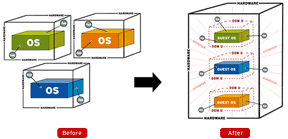 Consider for example, the following statement found on WiredTree's site (listed under the heading labeled » Enterprise Hardware):
WiredTree strictly limits the number of accounts assigned to each server to ensure all virtual environments remain highly responsive.
Now a greedy web host can "over-sell" a VPS as easily it can a Shared web server (especially when using Virtuozzo, tho somewhat harder to do with Xen and VMWare, which work differently .. by implementing hard/fixed limits for resources on each VPS).
But my observation at our new VPS (thus far, anyway) has been » faster-loading web pages .. especially those generated by a script, such as the one found at the Rad Community Forums (which use a Perl-based script).

Scripts tend to consume more CPU power when generating their dynamic web pages .. compared to simple, static html pages (such as the one you're reading now).
Moreover, and perhaps most importantly, a VPS provides you with all the freedom-of-configuration and power that is associated with low-level control (.. the kind that is normally hidden from users of Shared web hosting).
The physical server WiredTree uses (sometimes called a "hardware node" by webhosting geeks) comes with dual Intel Xeon Westmere processors (each of which contain 4 CPUs) .. for the combined processing power of 8 CPUs (per server).
In the past, Radified used to have problems with "excessive CPU usage" (back in our days of Shared web hosting). But not any more (here at our new VPS).
Another example of the dramatic difference in performance I observed between Shared web hosting and Virtual Private Servers came during the first time I used Movable Type at our VPS. Movable Type is the blogging software that Radified uses. It serves static web pages (i.e. » *.html), yet a script (also Perl-based) is used to generate these pages.
This speed-improvement (when using Movable Type) is probably the single biggest difference I've noticed at our new VPS » ~3 times faster, I'd guesstimate (.. based on a seat-of-the-pants feel). No more waiting for blog-pages to rebuild (which used to take forever).
In keeping with the latest research on web site optimization, I've busted up this guide into smaller, bite-sized pages. On the next page, we continue to compare the benefits of Virtual Private Servers with those offered by Shared web hosting providers. See below for linkage.